
IT PAYS TO SHOP
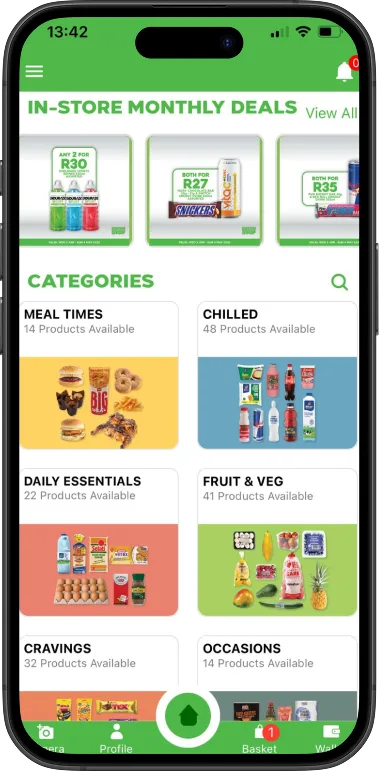
Get rewarded today with our Fresh Stop app
Get
Rewarded
It’s simple – Download the app , open the app, and search through the deals to find the items that you want to buy. Then reserve them on the app, head to your nearest FreshStop at Astron Energy, and buy the items to qualify for the cashback rewards. Scan your till slip, and you will get cashback into your wallet.
You can withdraw your money anytime to get your cashback rewards. It couldn’t be simpler!
Download the app



Frequently asked questions
1 - How do I register on the app?
Please download the app from the PlayStore or the AppStore. Once you have downloaded the app, tap on “Register” and complete all the fields.
2 - How do I reserve items on the app?
To reserve items, please follow the steps below:
- Click on the category e.g. “Kids Lunch Packs” to find your deals.
- Reserve the item by tapping on “Add to basket”.
3 - Why was my till slip not approved?
This could be as a result of a few things:
- Check that the date is clearly visible
- Check that the store name is clearly visible
- Slip is outdated. Slips need to be submitted within 48 hours of purchase.
- The till slip is unreadable
- The item/s you selected were not on the slip.
- The items on your slip do not match the items available on the app.
- The slip is not from FreshStop at Caltex.
4 - How do I submit my slip?
- Click on camera icon (top-right corner).
- Click “Capture Slip”.
- A pop-up message will display. “Select your purchased items from your reserved list”.
- Select the items and click “Capture”.
- Capture your till slip.
- Wait for the slip to upload before closing the app.
5 - Why are all the products in the store not on the app?
Only certain products are on promotion at one time. Hopefully you will see your favourite soon. Only items the are displayed on the app are eligible for redemption.
6 - Why are all the items on the app not in the store?
Unfortunately, not all the FreshStop at Caltex stores will stock all the reward items.
7 - I bought items at Food Lover’s Market (or any other store besides FreshStop at Caltex store) but my slip was not approved. Why is that so?
The app is only for use at FreshStop at Caltex stores.
8 - How do the Rewards work? Do I get points?
No, the cash value of the discount is accumulated on the app “wallet”. You can cash out at anytime and deposit the cash straight into your banking account
9 - I bought 2 x (any item on app) but only received rewards for 1 of them. Why is that?
Please be advised that rewards are limited to 1 per customer, per product per day.
10 - Is this App free to use?
The app is 100% free to use and to download. All you need is an internet connection and data to access it.
11 - How can I find my nearest FreshStop at Caltex store?
First make sure you GPS location on your mobile device is on. To find your nearest FreshStop at Caltex store, go onto the app and tap on “Find A Store”. It will show your nearest store from your current location.
12 - What is the waiting period for slip validation? Why is my slip still pending?
Slips are validated within 72 hours of purchase. Once it has been validated, your “wallet” balance will be updated.
13 - Do I have to wait for my slips to be validated before I can submit another slip?
No, you do not need to wait for your slip to be validated in order to upload more slips. Your “wallet” balance will have a pending balance until it is validated.
14 - How does one remove an invalid reward that has been confirmed as invalid?
Once a slip is submitted it cannot be deleted from your profile. If the slip is invalid, it will not give any rewards.
15 - Do I have to reserve items before I purchase, or can I purchase items before reserving?
You can reserve after you purchase, as long as you reserve before you upload and you upload your slip within 48 hours of purchase.
16 - What does one per customer mean?
You cannot reserve two of the same items on the same day.
17 - I have still not received payment?
Please make sure you check your bank statement. Note there is a R2.50 bank charge, so if you are due R100, look out for a credit of R97.50.
18 - I requested a cash out and there was a R2.50 missing from my amount. Why?
The R2.50 is not a penalization, it is a fixed bank charge in order to pay the cash to your bank account.
19 - How do I cashout on the app?
To cash out you need to make sure you have a minimum reward value of R50.
Follow the steps below:
- Tap on “Cash” at the bottom of your screen.
- Tap on “Reward Me”.
- A pop up will appear, tap “Ok”.
- Under “Current Balance”, choose an amount you wish to cashout (bear in mind that there is a R2.50 bank charge).
- Tap on “Let’s Go”.
- A pop up will appear, tap “Ok”.
- Add your banking details and tap “Submit”.
20 - Can I change my bank details when cashing out?
Yes, you can. With your next cashout just use the banking details you want the cashout to be paid into.
21 - Can 2 separate customers have their rewards deposited into the same bank account?
Yes, they can. You provide the bank details when you instruct the cash out and those are the details we will use when we make the payment.
22 - How long can I accumulate the rewards amount before I lose it?
You will never lose your rewards. You can accumulate until you decide to cashout.
23 - I uploaded 2 slips in one upload. Why were my rewards not approved?
You can only submit one slip at a time.
24 - How do I add the promotional items to the basket?
Please note that not all current promotions have reward values on the app. The promotions are just to display which items are on promotion in store. If the promotion does not correspond with the reward item, then it does not form part of the rewards.
25 - I purchased a burger pie, but it was recorded as a sausage roll on my slip?
We can only approve items which are on the till slip as we are not physically in the store. Please check your slip instore before leaving. Please contact the store directly to rectify.
26 - Where are the prices on the items you get rewards on? I only see reward values but not what it cost?
This is a rewards app, so we do not display pricing on the app. Kindly visit or call your nearest FreshStop at Caltex store for prices.
